
What’s up, creators! John here. If you are anything like me, your workspace is all about speed, efficiency, and reclaiming your creative time from tedious digital hurdles. Today, we are breaking down a friction point in Canva that has been slowing down digital production pipelines for thousands of creators—and I'm giving you a stupidly simple, brilliant workaround to bypass it entirely.
If you don't already have a Canva account, head on over to Canva and set up a free account today!. There are hundreds of tools you can use absolutely free... even the magic layers feature.
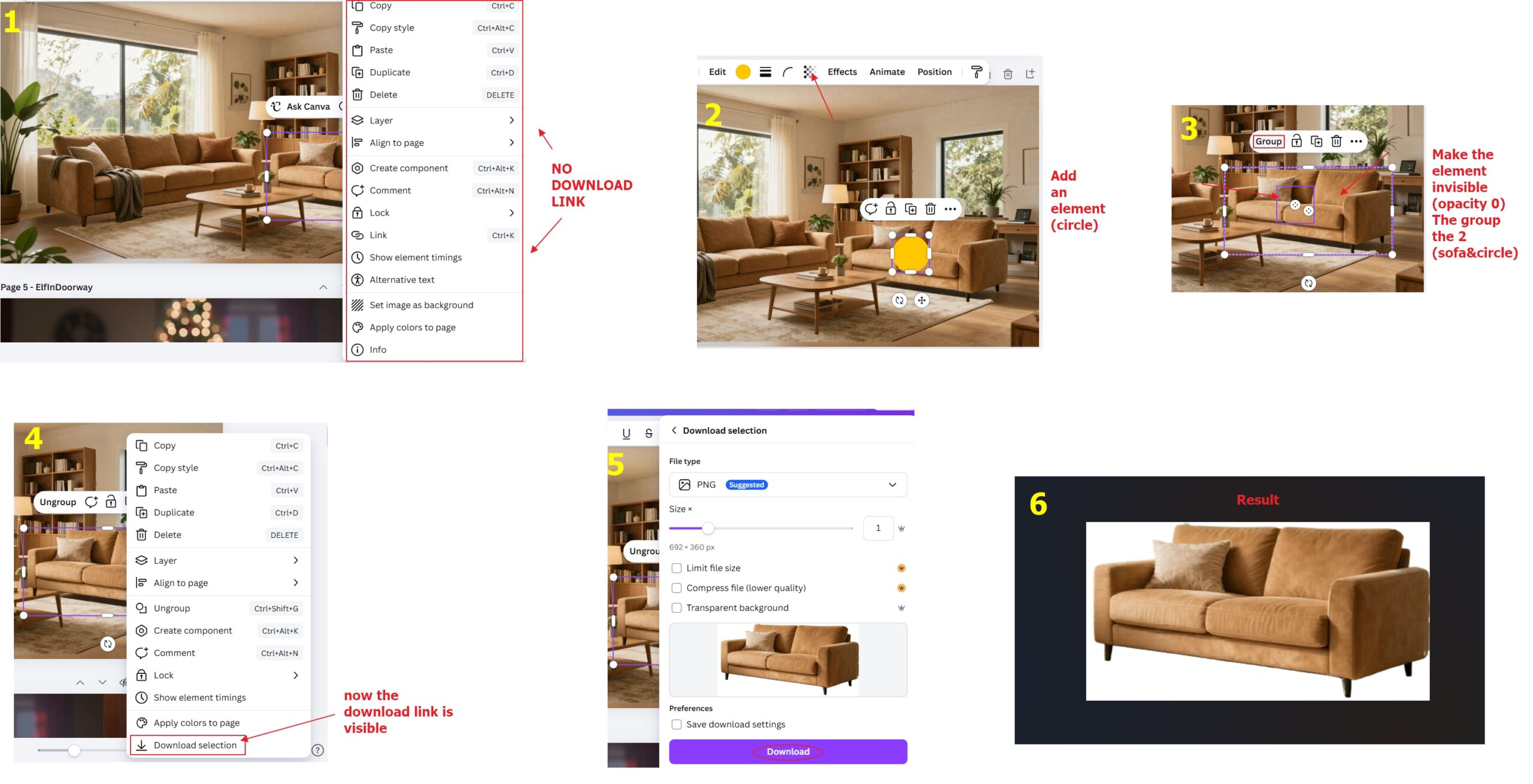
Canva recently rolled out their Magic Layers feature, and let's be honest, it is fantastic for quickly slicing and separating individual elements in a complex visual. But Canva did something incredibly frustrating: they locked down your ability to export those segmented layers individually. Normally, when you right-click a single layer element, there is absolutely no option to download selection in the pop-up menu. To get that element out, you are forced to drag it to a completely brand-new page, scale it manually, export the whole page with transparency turned on, and then delete the temp page. It’s a multi-step, momentum-killing headache.
But you know how we roll here. We don't accept artificial workflow blockades. I found a hidden backdoor in Canva's interface logic that lets you download any isolated element instantly with a single right-click—and yes, this works flawlessly even if you are on the completely FREE, non-paid tier of Canva! Let's dive in.
The Invisible Anchor Hack: 30 Seconds to Instant Exports
The secret lies in tricking Canva's context menu. Canva restricts individual layer selections from being exported directly to protect the document structure. However, Canva’s design architecture allows grouped assets to be saved directly to your local drive.
By grouping your segmented element with a completely transparent "ghost" element, we unlock the secret download option instantly.
Here is your step-by-step blueprint to pull this off:
🛠️ Step 1: Prep Your Magic Layers
Isolate your graphic using Canva’s native Magic Layers tool. Once you have separated the exact asset you want to extract, leave it sitting right where it is.
⬜ Step 2: Drop in a Ghost Shape
Add a basic vector element to your canvas—a standard square or circle works perfectly. Drag and position this new shape directly over the item you want to export and resize it so it's smaller than the item you want to export.
👻 Step 3: Turn the Opacity to Zero
Select the shape you just created, click on the Transparency tool in the top navigation bar (it looks like a checker board), and slide that bad boy all the way down to 0%. Your shape is now completely invisible, but Canva still registers its physical boundaries.
🔗 Step 4: Group and Bypass
Select both your target item and the invisible shape. Right-click and choose Group (or press Ctrl +G / Cmd + G).
🚀 Step 5: Right-Click and Download!
Now for the magic. Right-click your newly grouped item, scroll toward the bottom of the list, and—boom!—the Download link is now fully visible and active. Click it, export your groupted items as a transparent PNG, and keep your creative momentum moving.
Why This Workflow Hack is a Game Changer:
- 100% Free-Tier Approved: You don't need a premium Canva Pro subscription to unlock individual transparency exports. This workaround works beautifully on a standard, zero-dollar free account.
- Zero Added Pages: No more building and deleting endless scratchpad pages in your project.
- Preserves Scale and Proportions: Your asset exports cleanly with its relative dimensions intact.
- 100% Free Setup: No paid apps, third-party extensions, or premium subscription tiers required.
Smash Subscriptions and Build Better Assets
As solo creators, our ultimate competitive leverage is speed. When you eliminate these micro-bottlenecks from your production pipeline, you free up hours of mental bandwidth to focus on what actually matters: creativity - building high-impact content and leveling up your brand.
If you want to step away from Canva entirely and access raw, state-of-the-art visual generation engines that give you complete, unrestricted control over your assets from day one, you need to check out Artistly AI. It’s a high-performance, subscription-busting suite that generates professional-grade transparent graphics, custom vectors, and mockups without forcing you into recurring monthly SaaS trapdoors.
Want more weekly visual blueprints, workflow automations, and raw vibe-coding tutorials? Head over to the channel and subscribe to get every single update the second it drops.
This is stunning. I have an Canva account and struggle a little bit, but with your tutorials I feel confidant to to begin new projects.
Glad it was helpful. Keep watching for more tips soon.